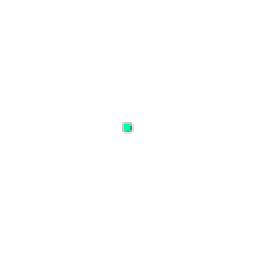
Drawn from the code and zoomed in. In the game it scales with your resolution.
Community crosshair · Plus
Vikas Code
Shared by vikas218 in the Ascend community.
This crosshair is visible in all maps and doesn't clutter the whole screen but it's not recommended for jett players.
Import code
0;s;1;P;c;8;u;00FFAFFF;o;0.113;d;1;b;1;z;3;f;0;m;1;0l;2;0v;2;0o;0;0a;1;0f;0;1b;0;S;s;1.001- Shape
- Plus
- Copied
- 1 copy
- Added
- Jul 14, 2026
Adding your own crosshair comes with Ascend accounts.
Import
Four steps, about a minute.
- 01
Copy the import code
Click Copy on any card in Ascend's gallery. The full import string lands on your clipboard, ready to paste.
- 02
Open VALORANT settings
Launch VALORANT, press Escape, and open Settings. Switch to the Crosshair tab in the top navigation bar.
- 03
Open the import dialog
On the Crosshair tab, click Import Profile Code at the top right. A small text field opens, ready for a code.
- 04
Paste and import code
Paste the code (Ctrl+V or Cmd+V) and click Import. VALORANT applies color, outline, dot and lines instantly.
- Copy
- Settings
- Crosshair
- Import
Related